Study Tracker Widget
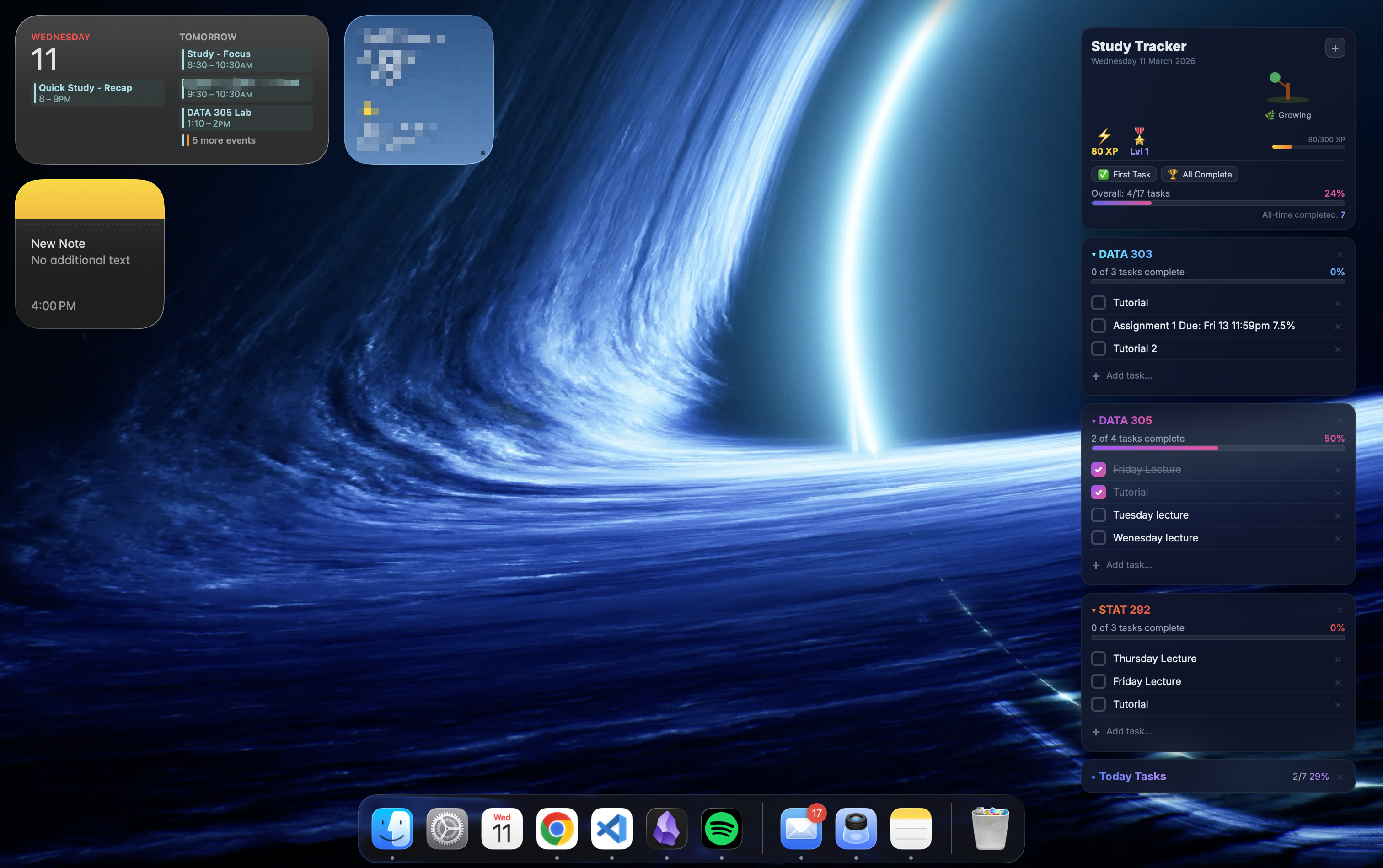
The Study Tracker widget on the iOS home screen
Project Overview
Study Tracker is an iOS widget I built to help organise my university study tasks. It is a desktop widget that provides a compact, glanceable view of course-by-course progress, daily task lists, and a gamified XP & levelling system to keep motivation high. This widget is interactive, allowing me to check off tasks as I complete them, and it visually represents my progress with a growing plant that flourishes as I get more done. I can add/remove courses and tasks as needed, and the widget updates in real-time to reflect my current status. (The tasks shown are demo data for demonstration purposes, I have done them, I swear!)
Key Features
- Course-based task management — organise tasks under each course (e.g. DATA 303, DATA 305, STAT 292) with lectures, tutorials, and assignments etc.
- Progress tracking — per-course and overall completion percentages with visual progress bars
- XP & levelling system — earn experience points for completing tasks, level up, and unlock badges like "First Task" and "All Complete"
- Growing plant visualisation — a virtual plant that grows as you complete more tasks, providing a satisfying visual reward
- Collapsible Tasks — each course's tasks can be expanded or collapsed for a cleaner view, in the example I added a section for todays tasks
- Interactive Editing — easily add, edit, or remove courses and their associated tasks to fit your study needs
- Desktop widget — quick at-a-glance progress right on your macOS desktop
Technical Details
- Built with React JSX for UI rendering, powered by the Übersicht desktop widget engine for macOS
- Custom SVG graphics for the knowledge tree visualisation that grows as tasks are completed
- CSS-in-JS styling with glassmorphism effects for a modern, translucent aesthetic
- Local data persistence for task state and progress, so entered tasks are saved and remain after reloads
- Responsive layout with custom animations for plant growth and XP progression
To avoid losing task updates, the widget serializes data to JSON and writes it to a local data file each time state changes. That means courses, task edits, and completion states persist between refreshes and desktop restarts.
function saveData(data) {
  const escaped = JSON.stringify(data).replace(/'/g, "'\\''");
  run(`echo '${escaped}' > ~/${DATA_FILE}`);
}
Motivation
Juggling multiple courses with lectures, tutorials, and assignments can be overwhelming. I wanted a tool that lives right on my home screen to give me instant visibility into what's done, what's due, and how I'm tracking overall. Sometimes I find that I want to quickly write down a task or check off something I just did, having it right there on the desktop makes it super convenient. Plus, I find that gamification elements like XP and levels make the process of checking off tasks quirky and fun. It's not just about getting things done, but also about making the journey rewarding and enjoyable.